
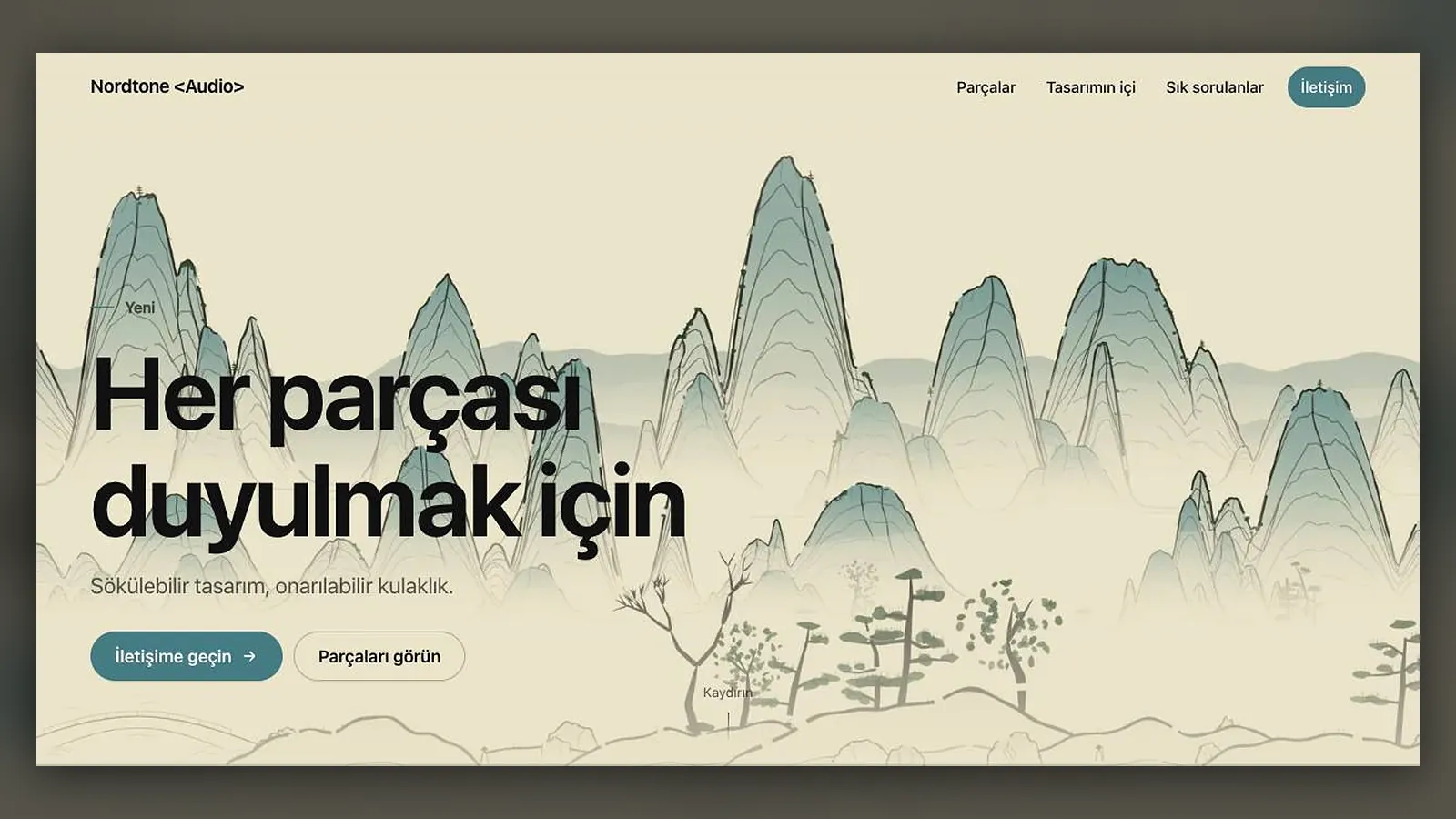
Website Studio turns a finished Assemble / Disassemble video into a one-page product site: as the visitor scrolls, the video plays frame by frame and your product comes apart or snaps together on screen. You choose the source video, add as much or as little about the product as you like, and Sam writes the copy, builds the page and hosts it.
This guide covers building the site. Publishing, the private link, the ZIP download and later edits are in publishing and sharing your site.
What do you need before you start?
You need one finished Assemble / Disassemble video. As of October 2026 every site is built from such a video; building a site from a description alone, without any video, is marked as coming soon in the app. If you do not have a video yet, make one first in Film Studio: the Assemble / Disassemble guide walks through flows, camera, length and quality.
There are two ways in:
- Open a finished Assemble / Disassemble project and press "Create a website from this video".
- Open Website Studio at /app/website, press Create and pick the source video from your finished projects.
How do you create the site, step by step?
- Choose the source video. Only finished Assemble / Disassemble videos are listed.
- Fill in brand and copy if you want to: brand name, product name, main headline, and the key messages you want on the page. Every field is optional; Sam fills anything you leave empty with sample copy that suits your product.
- Optionally add your existing website address and keep "Take the brand name, colours, logo and copy from this site" on. The home page and one inner page are read; this adds a minute or two.
- Add contact details and social media links if you want a contact section.
- Choose the menu: Features, Story, Gallery, FAQ and Contact can each be switched on or off and renamed.
- Pick colour and theme (Automatic, Dark or Light), an accent colour or "From the brand", and the background: Plain or Ink landscape.
- Decide on images, a second scene and the site language, check the total cost and press "Create the site with Sam".
You can also fill in the optional Avoid field to list things you do not want in the copy or generated images; leave it empty and it is ignored.
What does Sam write, and what comes from you?
Sam writes the headline, subheadline, feature list with part names, story section, specifications, FAQ, gallery captions, footer note and the page title and description for search engines. Anything you typed is used as given; anything you left empty is written to fit the product in your video. If you let Sam read your website, the brand name, colours, logo and copy are taken from there, so the new page sounds like the rest of your brand.
Write your key messages as plain facts: what the product is, who it is for, what makes it different, where it ships. Sam turns facts into copy far better than it invents claims, and you will have less to correct later.
Which images and scenes can the page use?
The gallery can hold up to 8 images. You have three options:
- Pick images from your library for the gallery.
- Use video frames only: keyframes and selected moments of the video go into the gallery. This is free.
- Generate images: your product is photographed in realistic settings, 1 to 4 images. This is charged, and the cost is added to the quote.
A second scene is optional. You can add another Assemble video or an image, so the page has a second product moment further down.
What does the ink landscape background do?
Ink landscape draws a light shan shui landscape in your theme colours behind the page. It flows as the visitor scrolls, so the background moves with the product video. For visitors who have turned on reduced motion, it stays still. It is a design choice, not a separate generation, and there is no extra line for it in the quote. The same landscape engine powers Ink Landscape in Animation Studio.
How long does it take, and what can you watch?
Building a site usually takes a few minutes. Reading your existing website adds a minute or two. The progress shows the stages: reading your site, copy, frames, images and packaging. You may leave the page; the site appears in Website Studio when it is ready. At most two websites can be prepared at the same time.
What does a website cost?
The quote has up to three lines: frames, package and hosting; copywriting; and images when you generate them. The live list prices (Basic plan, ×1.0) are:
| Line | Tokens | About |
|---|---|---|
| Frames, package and hosting | 8,751 | $0.05 |
| Generated image, each | 8,751 | $0.05 |
| Copywriting | shown in the quote | depends on the content |
The Free plan pays ×1.3 and Pro ×0.8 of these prices. Editing the copy and theme later and repackaging is free. If the site cannot be created, the tokens spent are refunded to your account automatically. Current prices are always on the pricing page.
What if something goes wrong?
- "The website address is not valid" or "This address could not be found": check the address you gave for reading, or remove it and try without.
- "At most two websites can be prepared at the same time": wait for one to finish.
- "You have reached the website limit": delete sites you no longer use.
- Status Failed: the tokens are refunded; start again from the same video.
For the idea behind this kind of page, see how a scroll-driven product page works.
Frequently asked
Can I build a site without an Assemble / Disassemble video? Not yet. As of October 2026 every site starts from a finished Assemble / Disassemble video; building from a description alone is announced as coming soon.
Do I have to fill in every field? No. Every field is optional. Sam fills empty fields with sample copy that suits the product, and you can edit all of it after the site is built.
In which languages can the site be written? You choose the site language in the form; the app's six languages are available: Turkish, English, German, French, Spanish and Italian.
Is the site public as soon as it is ready? No. Every new site starts as private, visible only to you. You decide later whether to make it public or download it as a ZIP.
Does the ink landscape background cost extra? No. It is a background option of the page and does not add a line to the quote.