
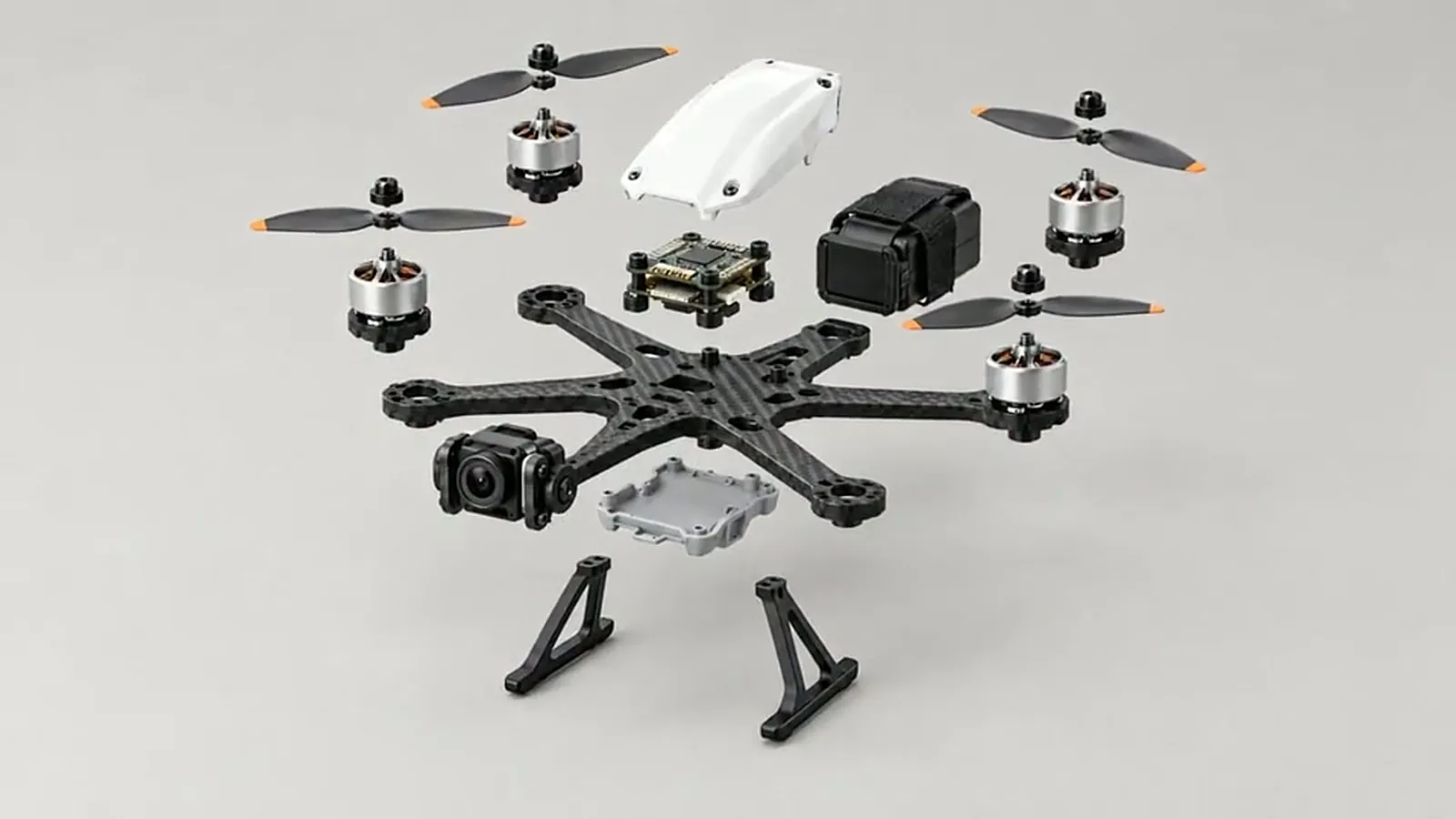
Assemble / Disassemble is a Film Studio template that turns one product into a video where it comes apart piece by piece or snaps together from its parts. You give a product photo or a short description, choose the flow, camera, length, quality and aspect ratio, and the studio plans the shots, draws the keyframes and generates the video.
Where do you find it?
Open Film Studio at /app/studio, stay on Create, choose the Templates tab, then Product Ads, and pick the Assemble / Disassemble card. It opens its own form, separate from the other video templates.
Photo or description: how do you give the product?
- Photo: upload or choose a product photo. A sharp photo showing the whole product gives the best result. You can add a short note about the product.
- Description: describe the product in one or two sentences, for example a compact drone with a white body, carbon arms and orange-tipped propellers.
With a photo you also get two options that are covered in their own guide: "Use my photo as it is" and "Enhance the image with Sam". See the product photo guide.
Which flow should you choose?
| Flow | What happens |
|---|---|
| Whole to parts | The finished product comes apart into its parts. |
| Parts to whole | The parts float in and snap together into the finished product. |
| Take apart and rebuild | The product comes apart, then rebuilds itself. |
| Build and take apart | The parts come together, then the product comes apart again. |
The two round-trip flows are cheaper than they look: the second half is the first half played in reverse, so it needs no extra generation and is not charged. A 20-second round trip costs the same video time as a 10-second one-way video.
What do the camera options do?
- Locked: the camera stays still; the product moves in front of it.
- 180° orbit: the camera travels half way around the product.
- 360° orbit: the camera circles the product completely.
With an orbit, each section of the video lasts 10 seconds, and a 360° orbit needs at least 20 seconds of generation. That is why some lengths disappear from the list when you change the flow or the camera.
Which lengths are available?
The lengths are 5, 10, 20, 30, 40 and 60 seconds, filtered by flow and camera:
| Flow | Locked | 180° orbit | 360° orbit |
|---|---|---|---|
| One way (whole to parts, parts to whole) | 5, 10, 20, 30, 40, 60 s | 10, 20, 30, 40, 60 s | 20, 30, 40, 60 s |
| Round trip (take apart and rebuild, build and take apart) | 10, 20, 30, 40, 60 s | 20, 40, 60 s | 40, 60 s |
Videos longer than 10 seconds of generation are produced in 10-second sections joined by extra in-between frames, which keeps the product consistent from section to section.
Which quality and aspect ratio?
- Standard: 720p.
- Pro: 1080p.
- 4K: 2160p, available only with a subscription (Basic or Pro).
Aspect ratios are 16:9, 9:16 and 1:1. Use the Extra direction field for things like "dark grey background, keep the propellers at the top", and the optional Avoid field for things you do not want to see.
What does it cost?
The total is shown before you start and is made of the video (generated seconds × the quality price), the keyframes, any in-between frames, and a small planning fee. Live list prices (Basic plan, ×1.0):
| Item | Tokens | About |
|---|---|---|
| Video, Standard, per second | 24,501 | $0.15 |
| Video, Pro, per second | 32,667 | $0.20 |
| Video, 4K, per second | 122,501 | $0.74 |
| Start and end frames | 29,167 | $0.18 |
| End frame only (photo used as is) | 16,334 | $0.10 |
| Extra in-between frame | 16,334 | $0.10 |
A 5-second Standard video with a locked camera is about 151,672 tokens plus the planning fee, roughly $0.91. Free pays ×1.3, Pro ×0.8. Current prices are on the pricing page.
How does regeneration work?
If you are not happy with the result, you can regenerate it with the same keyframes and scene plan. For videos up to 8 seconds (in practice the 5-second one-way option) the first regeneration is free. For longer videos, or after you have used the free one, only the video is charged (generated seconds × quality), as many times as you like. If a paid regeneration fails, the tokens are refunded and your previous video stays. Every result is kept under Versions.
How long does it take, and what happens next?
A 5-second Standard video usually takes a couple of minutes; longer and higher-quality videos take longer. You may leave the page, the video is also saved to your library, and at most two videos can be generated at the same time. If generation fails, the tokens are refunded automatically. When the video is ready you can press "Create a website from this video" to turn it into a scrolling product page with Website Studio. For the background on this kind of shot, see what an exploded-view product animation is.
Frequently asked
Why can't I pick 5 seconds with a 360° orbit? A 360° orbit needs at least 20 seconds of generation, and orbits work in 10-second sections, so only the longer lengths are offered.
Is the reverse half of a round trip charged? No. The reverse direction needs no extra generation and is not charged.
Who can use 4K? 4K is available with a subscription, Basic or Pro. On the Free plan the 4K option is locked.
Is the free regeneration available for every video? No. It applies once, to videos up to 8 seconds. Longer videos can be regenerated for the video price only.
What if the content does not pass the safety check? The video is not generated and the tokens are refunded. Try a different product photo or description.