
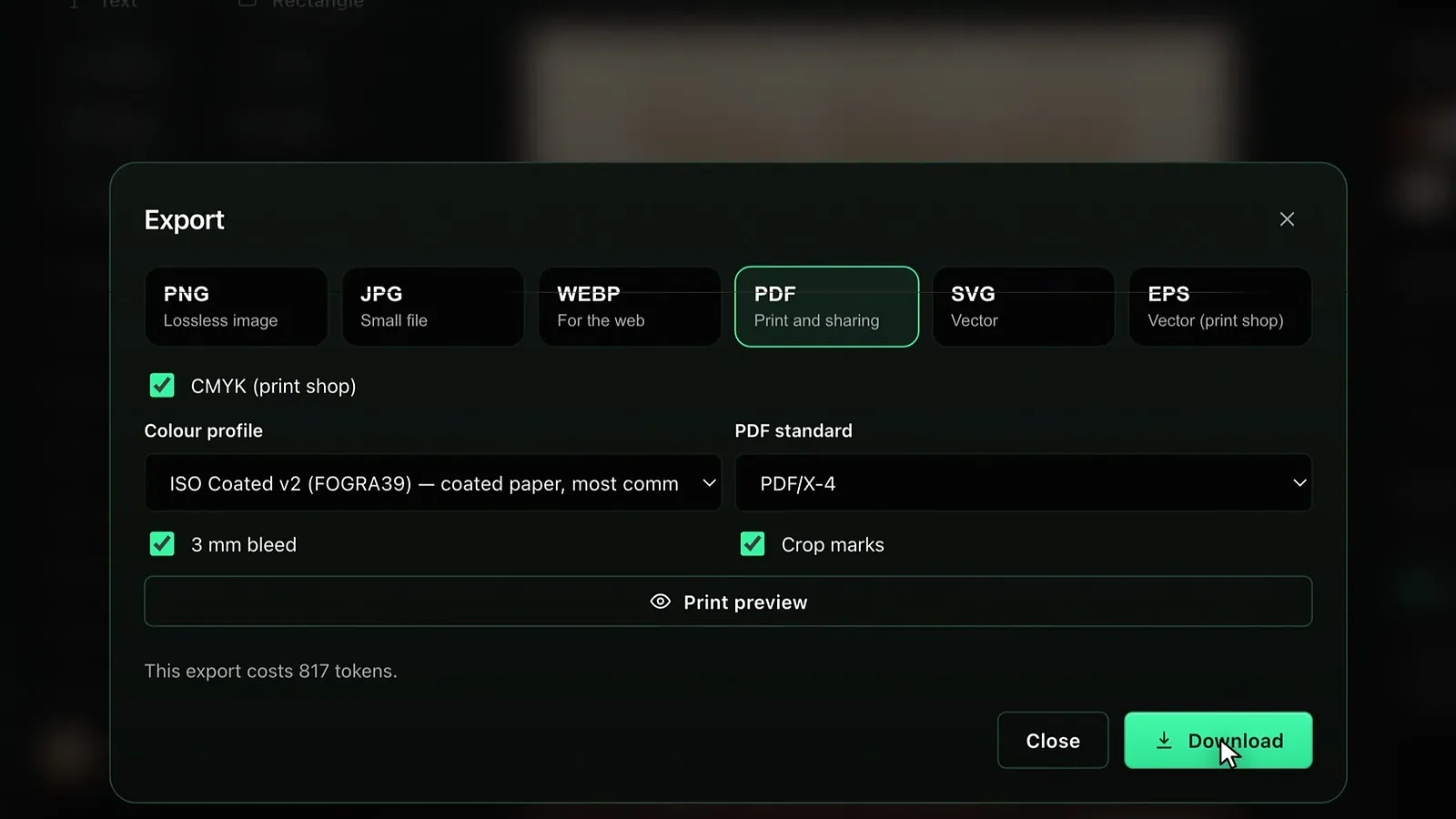
To get a print-ready file from Design Studio, bring the image layer to Print 4K or Premium 4K, choose PDF in the Export window, tick CMYK, pick a colour profile and a PDF standard (PDF/X-4 is recommended), leave the 3 mm bleed and crop marks on, and download. PDF, SVG, EPS and CMYK are available from the Basic plan.
This guide covers upgrading quality, export formats, plan rules, colour profiles, PDF/X standards and the print preview, as of October 2026.
Before printing: check the image quality
If you created the design in Draft, the editor shows “The image layer is draft quality” and an Upgrade to 4K button. That button raises the image layer to Print 4K while keeping the same composition; the list price is 44,042 tokens (about $0.26). Print 4K is fit for direct printing up to A3; larger formats are scaled. For large jobs such as A2 and bigger posters or roll-ups, Add detail increases texture and sharpness; see the SVG, EPS and Add detail guide. Premium 4K (71,167 tokens, about $0.43) gives the cleanest edges and text harmony.
Export formats and plan rules
| Format | Description in the app | Free | Basic and Pro |
|---|---|---|---|
| PNG | Lossless image | Yes (RGB) | Yes |
| JPG | Small file | Yes (RGB) | Yes, optional CMYK |
| WEBP | For the web | Yes (RGB) | Yes |
| Print and sharing | Locked (BASIC) | RGB or CMYK, PDF/X-4, PDF/X-1a | |
| SVG | Vector | Locked (BASIC) | Yes |
| EPS | Vector (print shop) | Locked (BASIC) | Yes |
On the Free plan, PNG, JPG and WEBP downloads with a long edge up to 720 pixels carry no watermark; larger ones do. For image formats you can choose the print size or full size, 2048, 1080 or 720 pixels, or a custom long edge. For plans and watermarks, see the plans and watermark guide.
CMYK and the colour profile
Screens make colour with light (RGB), presses with ink (CMYK), so a print file should be CMYK. When you tick CMYK (print shop) with PDF or JPG selected, two colour profiles appear: ISO Coated v2 (FOGRA39), the default and the most common one for coated paper, and PSO Coated v3 (FOGRA51), a newer coated paper profile. If your printer asks for a specific profile, choose it; if you do not know, FOGRA39 is the safe choice. For the difference between the colour spaces, see CMYK vs RGB.
PDF/X-4 or PDF/X-1a?
| Option | What it does | When to use it |
|---|---|---|
| PDF/X-4 (recommended) | Transparency and layers are kept; text and vector elements stay sharp. | For most modern print shops |
| PDF/X-1a | Transparency is flattened; in the process text becomes a 300 dpi image. | When your printer explicitly asks for X-1a |
| CMYK PDF (no standard) | Produces a plain PDF in CMYK, without a standard check. | Quick proofs, digital presses |
The reason PDF/X-4 is recommended is text: because X-1a has to flatten transparency, text stops being vector and turns into a 300 dpi image. In small type the difference can be visible under a loupe. In X-4 text edges stay sharp at any size. For the standards in detail, see print-ready PDF/X.
Bleed and crop marks
On print canvases with PDF selected, the 3 mm bleed and Crop marks boxes appear; both are on by default. Bleed means the background extends 3 mm beyond the trim line, so no white strip is left at the edge even if the cut shifts slightly. Crop marks in the page corners show the printer where to cut. Crop marks can only be added while bleed is on.
Bleed only matters for the background; text and logos should stay inside the trim line, within the green dashed safe area in the editor. Before exporting, switching on both lines with the Bleed and safe area button and checking each corner once prevents the most common error printers send back.
Print preview (soft proof)
With CMYK ticked, the Print preview button shows on screen how the design will look when printed with the chosen profile. It comes with an Areas that lose colour image: the regions that will print duller are marked in magenta, and the share of the design that will look duller is shown as a percentage. If there is no loss, the note says the colours print without noticeable loss. Very bright neons and saturated blue-greens are usually the colours most affected.
If the preview shows a large loss of colour, darken the most saturated colours slightly in the editor or pick a less saturated shade from the palette, then run the preview again. Once the loss drops below a few percent, no noticeable difference is expected in print.
Step by step: preparing a PDF for the printer
- If the image layer is Draft, press Upgrade to 4K and wait for it to finish.
- Turn on the bleed and safe area lines and check that text and logos sit inside the safe area.
- Press Export and choose PDF.
- Tick CMYK (print shop) and choose the colour profile.
- Leave PDF/X-4 as the PDF standard; choose PDF/X-1a if the printer asks for it.
- Keep 3 mm bleed and Crop marks on.
- Check colour loss with Print preview and adjust colours if needed.
- Press Download; the download starts on its own when the file is ready.
How much does an export cost?
For CMYK PDF, CMYK JPG, SVG and EPS exports the window shows “This export costs 1,021 tokens” (Basic list price, about $0.01; Pro ×0.8). This note does not appear for RGB image formats. If an export cannot be completed, the tokens are refunded. Current prices are on the pricing page; for an overview of the studio, see the Design Studio page.
Frequently asked
Can I export PDF on the Free plan? No. PDF, SVG, EPS and CMYK carry a BASIC badge and are available on Basic and Pro subscriptions.
I do not know which profile my printer wants; what should I pick? ISO Coated v2 (FOGRA39), common for coated paper, is the default. If unsure, ask your printer; if you must send without asking, FOGRA39 and PDF/X-4 are a safe start.
Why can text look soft in PDF/X-1a? X-1a flattens transparency, and in the process text becomes a 300 dpi image. PDF/X-4 keeps text as vector.
Can I turn bleed off? Yes, untick the box; for anything that will be trimmed after printing, keeping it on is recommended.
Does a legibility warning block the download? No. The window counts hard-to-read texts and warns you; you can still download the file.